-
Table of Contents
-
1.EOS Model and Accountability Chart
-
2. Branding and Marketing
-
2.1 Integrated Marketing Plan
- 1YNP - One Year Nurture Plan
- AEU - Annual Equity Update (2024)
- Client Events (2024)
- Leads - How to Convert New Leads (2024)
- Listings - Leveraging Listings to meet more clients (2023)
- REALM - MLS as a Marketing Tool (2024)
- Annual Contact Cadence (Email, Newsletter, Personal Outreach & Events)
- Paperwork - Paperwork as a Marketing Tool (2024)
- Solving Problems - Problems Can be a Marketing Opportunity (2024)
- Referrals - Systems for Generating Referrals (2024)
- W&Q - Weekly and Quarterly Updates (2024)
-
WCR - Weekly Content Roundup (2024)
- WNE - What's Next Emails For Each Stage (2024)
-
2.2 Brand Guidelines
-
2.3 Social Media Presence
-
2.4 Marketing Campaigns
-
Listing Paid Marketing
-
Farming Beacon Hill
- Purpose and Goals
- Strategy and Principles
-
Mass Mailers and Post Cards
-
Beacon Hill Website
- Social Media
- Sponsorships and Community Events
- Charity and Fundraising
- Local Partnerships
- Local Initiatives
- Special Projects
- Preparation
- Step-by-Step Execution
- Measurement and Reporting
- Roles and Responsibilities
- Future Expansion
- Related Resources
- [Playbook: Thanksgiving Fall Pie Giveaway]
- [Playbook: Tire Change Days]
- [Playbook: Annual Holiday Kick-Off Perogy Party]
- KTS Videos
-
-
2.5 Community Presence
- 2.6 Measurement and Reporting
-
2.7 Marketing Processes
-
-
3. Website (Nickfundytus.ca)
-
4. Onboarding
-
5. Operations
-
5.1 Google Drive Organization
-
5.2 Google Chat Communication
-
5.3 File and Document Standards
- 5.4 Task and Workflow Management
-
5.5 Administrative Playbooks
-
Preparing Documents for Electronic Signing
-
Listing Processes
-
ShowingTime
-
Open Houses
- Monthly Financial Update
- Weekly Market Update
-
When Listings go Conditional/Firm
-
Weekly/Monthly Card Processes
- Commission and EFT Documents
- Google Reviews
-
- 5.6 Common Troubleshooting
-
-
6. Finance
-
7. Tools and Software
-
7.1 Follow Up Boss (CRM)
-
7.2 Google Workspace
- 7.3 EOS One
-
7.4 Faltour/Nexone
- Faltour - Transaction Data Entry Standards for Buyer Agents
- How to Mark Up a Counter-Offer for E-Signatures
- How to Create and Upload FINTRAC Forms
- Finalizing in Nexone
- How to Check Through Listings and Transactions
- File Naming Conventions When Uploading
- Nexone Conveyance Standards: Sending Documents to Lawyers and Lenders
- Prop T/X
- 7.5 Monday.com
-
7.6 Marketing Tools (Digital)
-
7.7 Physical Tools
-
7.8 Other Key Platforms
-
-
8. Resources
-
8.1 Scripts and Templates (Internal)
- 8.2 Guides (Client-Facing)
-
8.3 Checklists
-
8.4 Training Materials (Internal)
- The Ideal Realtor Work Week
-
Nick's Training Courses
- Tom Storey Seminar Notes - 24% Return on Database
- YouTube Lessons
- Further Learning
-
Standard OREA Forms
- How to Send a Referral to a Realtor in another Market
- Ottawa Neighborhoods - Districts
- Condo Amenities' Locations
-
Working with a Buyer
-
Listing a Property for Sale
-
Common Tasks and How-To's
- Ads - Create a Facebook Lead Ad for a Listing (2022)
- Buyer Specialist - People - Getting Into a Routine
- Buyer Specialist - Clients - Showings - Booking Showings
- Buyer Specialist - Clients - Showings - Communicating Showings With Clients
- Buyer Specialist - Leads - Systemic Follow-Up
- Buyer Specialist - People - How to Organize People to Reach Them
- Buyer Specialist - People - How to Lead Generate
- Calls - Reasons to Call Someone
- Client Service - How to do a weekly update.
- Closing - What Forms Are Sent Where
- Commissions - Entering team commissions in NexOne (2023)
- Contests - How to Export from KingSumo to Bombbomb
- Courier - How to Courier an Item or Document
- CRM - Client Record Audit
- COVID-19 - Special Procedures
- Drive - How to Organize Google Drive
- Final Walkthrough - How to Schedule a Final Walkthrough with a Client
- Firm Sale - Sales Assistant Commission
- Firm Sale - Sales Assistant Invoice (OLD PROCESS)
- Forms - Sales Assistant (SA) Invoice (2021) Procedure
- Leads - How to write a calendar invitation to a lead
- Leads - How to write a postcard to a new lead.
- Leads - How to Introduce Yourself to a New Lead
- Listings - Gathering Listing Activity Feedback (2023)
- Meetings - Daily Check-ins
- Meetings - How to Run a "Same Page" Meeting
- People - Accounting and Bookkeeping
- Showing Time - Setting Up
- How to create a YouTube Thumbnail
- Follow Up Boss - How to send a batch email to just your own clients.
-
Organization - Marketing Administrator Calendar Reoccurring Items
- Prospecting - Power Hours 2024
- How to Record and Publish a Client How-To
- How To - Referral Form
- How to hold an Open House
- 8.5 Mortgage Professionals
-
8.6 Glossary of Terms
-
-
9. Appendices
-
9.1 Policies and Compliance
-
9.2 HR and Team Policies
-
9.3 Retired Processes
-
Team Overview (2023)
- Our Current Team (2023)
- Organizational Structure and Role Descriptions
-
Organizational Structure and Role Descriptions (2023)
- Organizational Structure (Midsize Team)
-
Job Description - Listing Manager/Transaction Coordinator
- LM1.1 - Oversee all aspects of sellers transactions from initial contact to executed purchase agreement. (2022)
- LM1.2 - Prepare all listing materials (2022)
- LM1.3 - Prepping a property for listing
- LM1.4 - Obtain all necessary signatures
- LM1.5 - Coordinate showings
- LM1.6 - Obtain feedback from showings on our listings
- LM1.8 - Coordinate all public open houses and broker open houses
- LM1.9 - Input all listing information into MLS and marketing websites
- LM1.10 - Submit all necessary documentation to office broker for file compliance (2022)
- LM1.11 Input all necessary information into client database and transaction management systems.
- TC1.3 Coordinate mortgage and appraisal processes.
- TC1.4 Coordinate inspections and coordinate completion of repairs.
- TC1.5 Regularly update & maintain communication with clients, agents, title officer, lender etc.
- TC 1.6 Submit all necessary documentation to office broker for file compliance
- TC 1.7 Coordinate moving/possession schedules.
- TC1.8 Schedule, coordinate & attend closing process.
-
Job Description - Buyer Specialist
-
Job Description - In-House Inside Sales Agent 2022 (In Draft)
- Job Description - Inside Sales Agent (ISA)
-
Job Description - In-House Videographer (2022)
-
Job Description - Lead Buyer's Agent
- Job Description - Listing Agent
-
Job Description - Marketing Director and Administrative Manager
- 2023 Job Description - Associate Realtor - "Paper Agent"
- Job Description - Runner
- Job Description - Sales Manager
- Job Description - Showing Assistant
- Showing Assistant 2022
- Compensation Model
- CEO Tasks
- COO Tasks
- CFO Tasks
- Market in a Minute
-
Karim's Lead Source - Chloe
- In-House Listing Videos
- Marketing Overview (2023)
-
2024 Game Plan
- 2024 AP - Set a clear budget (incomplete)
- 2024 AP - Prioritize re-marketing and lookalike audiences (incomplete)
- 2024 AP - Block time for reverse prospecting
- 2024 AP - Create Consistency in Seller Follow-up
- 2024 AP - Create Standards for the Closing Process (Incomplete)
- 2024 AP - Clarify what we're measuring
- 2024 AP - Hold each other accountable for the actions that we're taking (Incomplete)
- 2024 AP - Keep FUB Tight and Well-organized
- 2024 AP - Run new ad campaigns
- 2024 AP - Refuse Overpriced Listings
- 2024 AP - Improve the listing process to be more intentional
- 2024 AP - Improve the Buyer Process to be more intentional
- 2024 AP - Hire three new Buyer Specialists in 2023. Keep 2
- 2024 AP - Revise Marketing Spend for Listings
- 2024 AP - Bring 3D Photography In-House
- 2024 AP - Launch Weekly Email
- 2024 AP - Launch Quarterly Print Newsletter
- 2024 AP - Activate Drip Campaign for ALL Leads
- 2024 AP - Print Materials for Listing Launch and Closing Baskets
- 2024 AP Set standards for sending referrals to team members
- 2024 AP - Relaunch Ourbeaconhill.ca (incomplete)
- 2024 AP - "Hire" Volunteers for ourbeaconhill.ca (incomplete)
- 2024 AP - Display our team and individual goals clearly in the office.
- 2025 Team Game Plan
-
-
9.4 Archived Documents
- Content - Home Stuff You Should Know (2022)
- Content - New Build Experience (2022)
- Content - Ottawa this Week (2022)
- Fundamentals of Digital Marketing
- Getting a Business Online
- Sales Assistant Invoice
- Listing Procedures (Old Procedures for Reference)
- Content Marketing Hub and Spoke
- Giveaway Contests (Social)
- Lead Magnets - How To Create a Lead Magnet
- Old Client Event Procedures
- 9.5 Historical References
-
-
- Gem for Monthly Pillar Posts
Preparing Webforms
Initialize: Log into Webforms and create a new transaction (if not already existing). If it is an existing transaction, search the transaction name and gather or add files to the specific transaction.
Compile: Gather the Buyer/Seller Representation Agreement, Schedules, and RECO Information Guide.
Draft: Ensure client names and signing dates are accurately filled in.
Download all documents needed and keep in folder for the specific transaction
Requesting Signatures (NEXONE)
Upload: Move documents from Webforms to the client file in NEXONE by opening the transaction or listing in NEXONE and uploading the documents
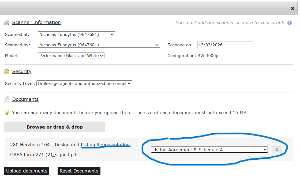
When uploading documents to nexone, ensure that each document is labelled correctly as what it is as seen in Figure 1. below.
Execute: In the Signature Tab, select Request Signatures. Map out all spots for client/agent initials, signatures, and timestamps.
When filling out the signature, initial, and timestamp locations in each document, ensure Agent or Client names are selected in the column on the left to ensure that each party can sign in the correct location.
When the document is filled out and ready for signing, send a copy to each party requiring signatures as well as yourself (admin) as a carbon copy.
Bombbomb video tutorial: http://vid.us/dbm2sk