Purpose
Publish a podcast episode from when the edited version is uploaded to Google Drive.
Summary
It is the Marketing Admin’s responsibility to publish the podcast within one day of it being uploaded to Google Drive. You will need to know how to use several tools (create and link instructions to each tool).
Google Drive
Clideo Audio Extractor (https://clideo.com/editor/cut-audio)
Simplecast
YouTube Studio/Podcast
Steps (Podcast episodes are published on Simplecast and as a Youtube Podcast)
Simplecast
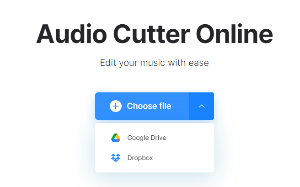
Navigate to Clideo’s audio extractor (or another audio extractor) and select the file by choosing the Google Drive option and selecting the correct video file from our Google Drive.
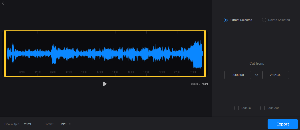
Select the entire audio when extracting (you may need to shave a portion of a second off at one end or the other to get the export button to be usable), otherwise you’ll just end up selecting a portion of the file instead of the whole thing.
Click “Export”
Click “Download” and download a copy to the desktop. (Optionally, you can choose the “save to Google Drive” option, which saves in a “Clideo” folder in Drive. You can then move that to the correct podcast folder)
Sign in to Simplecast. Ask Nick if you need the login info.
Add a new podcast episode. If you need notes on what to title the episode, or describe it, refer to the script for the episode If the script is light on content, refer to earlier episodes and follow naming and tagging conventions.
Include tags, episode art, strong descriptions that include plenty of keywords and strong show notes.
Click “Save Draft” and review that all aspects of the podcast are correct.
Add a transcript of the episode. You should have this from when you subtitled the YouTube version.
Select “Publish” and publish the episode, or schedule it for the future if it is supposed to be made available on a future date (this should match up with things like the YouTube publish date as well).
2026 Updates (Delete above after checking for what should be saved)
General: We are in Season 2.
🎙️ The "Realtor in Your Pocket" Playbook
Phase 1: Pre-Production (The Setup)
Target: 4+ weeks before recording date
Guest Outreach: Confirm guests for the two episodes being recorded.
Scripting: Write the "Set the Table" introduction (first 2-3 paragraphs) for both episodes.
Question Design: Draft the body questions.
Guest Briefing: Send the script intro and questions to guests 7 days before the studio date. This gives them time to prep their "pocket-sized" advice.
Phase 2: Production (The Studio Session)
Target: Monthly at Pop Up Podcasting
The "Cold Open" Shortcut:
To stop the "re-watching" bottleneck, you will use the Time-Stamp Method.
The Process: Bring a notepad or use a notes app during the recording. When you hear a guest say something particularly punchy, insightful, or provocative, glance at the studio clock. Mark the time (e.g., "14:20 - Why Ottawa prices won't drop").
The Handoff: Before leaving the studio, tell the Pop Up Podcasting technician: "The cold open for Episode A is at the 14-minute mark."
Phase 3: Post-Production (The Han-doff)
Target: ASAP after receiving the final product. (3 days max).
Review: Pop Up Podcasting sends the edited video files (with your pre-recorded intros/CTAs inserted). Hannah reviews the video for any technical glitches or final edit requests.
Basic material creation: branded thumbnail with episode title.
Transcribe: Use HappyScribe to create a text transcription of the episode and subtitles.
Audio Extraction: Hannah converts the video to audio using CapCut.
Publish: Publish audio of podcast to Simplecast. Publish video and subtitles to YouTube, ensuring continuity between all videos in the YouTube playlist (i.e. headline, description).
Phase 4: Content Multiplier (The "Hannah" Phase)
Target: 7–10 days before the 1st of the month.
SEO Blog Post: Hannah uses the transcript to write a blog post for nickfundytus.ca. Embed the YouTube video and the Simplecast player, and a heading with transcript.
Asset Creation: Using the transcript and video, Hannah pulls:
The Snippet: A 15-60 second "hook" video for Socials.
The Box Quote: One high-impact sentence from the guest - pull from cold open. Post to social media. A few slides of key quotes/takeaways/video clips.
Email promotion: Hannah to share the final podcast via Weekly Content Roundup and Weekly emails. Timing: the first week of the month where we aren’t promoting Monthly Market Update. Consider for future: Sending a separate email to WCR audience with podcast.
📅 Monthly Timeline & Cadence
Assuming a publish date of the 1st of every month.
Timing | Task | Owner |
Week -6 | Scripting & Guest Briefing sent | Nick |
Week -3 | Nick to send questions/structure of podcast. | |
Week -2 | RECORDING DAY (2 episodes) + Identify Cold Opens | Nick |
Week -1 | Edits received + AI Transcription run | Pop Up / Hannah |
Day 1 | PUBLISH: Simplecast, YouTube, Blog Post | Hannah |
Days 2-5 | MARKET: Meta Story, Meta Post, LinkedIn | Hannah |
📣 Marketing Assets Checklist
For every episode, Hannah should have the following ready to go:
[ ] Meta (FB/IG) Story: Video snippet (vertical) + "Link" sticker to the website.
[ ] Meta Post: Cover image + Box quote in the caption + Link to blog (not direct to YouTube).
[ ] LinkedIn Post: Professional summary of the topic + Video snippet + Link to blog (not direct to YouTube).
[ ] Website: New entry in the "Podcasts" page + Full Blog Post.
A Note on the "Cold Open"
Since you are recording two episodes back-to-back, the easiest way to manage this is to ask the tech to hit "mark" on their software when you signal them. At the end of the session, they can give you the exact timestamps, which you then send to Hannah. No more re-watching!