Email Signature Creation & Management Process
Team Fundytus
All Team Fundytus email signatures are created and managed through SyncSignature to ensure brand consistency across the entire team.
Signatures must follow a standardized structure and visual identity so that every email sent by the team reinforces the same brand presentation.
Marketing is responsible for creating, distributing, and verifying all signatures.
Create Signature in SyncSignature
All signatures must be created within SyncSignature using the Team Fundytus template.
The template ensures that every signature maintains consistent formatting, branding, and required elements.
Example:
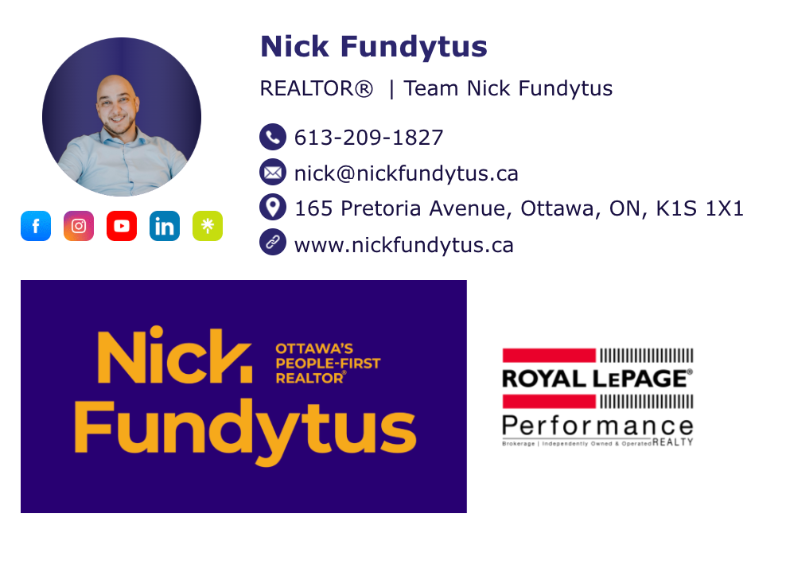
2. Headshot
Each signature must include:
Team member headshot
Headshot must be displayed in a circular frame
Image should be:
High resolution
Professionally cropped
Consistent with team headshot style
3. Social Media Links
Each signature must include the following social media links:
Required Links
Facebook (Team account)
YouTube (Team account)
Instagram (Agent account, if applicable and clearly branded to Team Fundytus)
LinkedIn (Team account)
Shor.By (Agent’s personal Shor.By page)
Icons should be displayed in a clean row beneath the headshot.
4. Name & Title
Each signature must clearly display the team member’s full name and professional title.
Title format must follow this structure:
Example
Marketing Director | Team Nick Fundytus
If the word REALTOR appears, it must be formatted as:
REALTOR®
Capitalized
With the registered trademark symbol
Only required the first time it appears
5. Contact Information
Each signature must include the following contact details:
Required Information
Phone number
Office address must always appear as:
165 Pretoria Avenue, Ottawa, ON, K1S 1X1
Website link:
6. Brand Graphics
Each signature must include the following brand assets:
Team Logo
Full Nick Fundytus logo
Yellow text on purple background
Includes the “Ottawa’s People-First REALTOR®” tagline
Brokerage Logo
Most recent Royal LePage Performance Realty logo
Both logos must appear clearly and proportionally within the signature.
7. Distribution to Team Members
Once the signature is finalized:
Marketing will send the completed signature to the team member via email.
The team member must then:
Install the signature in Gmail / Google Workspace
Install the signature in Follow Up Boss
8. Implementation Verification
Marketing is responsible for confirming that the signature has been properly applied.
Verification steps:
Confirm signature appears correctly in Google email signatures
Confirm signature appears correctly in Follow Up Boss
Send a test email to ensure formatting, images, and links render correctly
If any issues appear, Marketing must assist the team member in correcting them.
9. Ongoing Maintenance
Marketing is responsible for updating signatures when necessary, including:
Team member role changes
Updated headshots
Updated logos
Changes to social media links
Brokerage branding updates
All updates must be implemented through SyncSignature to maintain consistency across the team.