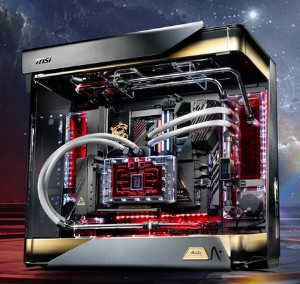
Building a gaming computer starts with understanding what you actually expect from it. The right configuration depends on the games you play, target resolution, desired frame rates, budget as well as whether the system will also handle streaming, editing or everyday work. A balanced approach is more useful than simply choosing the most expensive components.
Start With Your Gaming Goals
List the games you want to play & check their recommended hardware requirements. Competitive games may benefit from strong CPU performance as well as high frame rates, while visually demanding AAA titles place greater demands on the GPU. Your monitor also matters because a high-resolution or high-refresh-rate display requires suitable graphics performance. To buy a PC for gaming in Australia with high quality and affordability, visit this website.
Choose the Core Components
The CPU & GPU should receive most of your attention. The processor handles game logic, background applications & multitasking, while the graphics card has a major role in rendering game visuals & determining FPS. Avoid pairing a powerful GPU with an underpowered processor if your target games are CPU-intensive.
For memory, 16GB is a practical starting point for modern gaming, while 32GB can be useful for streaming, content creation, heavy multitasking or extensive game modifications.
Prioritize Fast Storage
An NVMe SSD provides fast data access & can reduce operating-system as well as game loading times compared with older hard drives. Choose capacity based on your game library because modern titles can occupy substantial storage space. A larger SSD can also reduce the need to constantly uninstall games.
Plan Cooling and Power
Cooling should match the hardware & workload. Good airflow helps remove heat, while an appropriate CPU cooler keeps processor temperatures under control during demanding sessions. Excessive heat can reduce performance through thermal throttling.
The power supply should provide enough capacity for the complete system with reasonable headroom for future upgrades. Check the power requirements of the selected CPU & GPU rather than choosing a PSU based only on wattage.
Check Compatibility Before Buying
Confirm that the CPU matches the motherboard socket, RAM is supported, the GPU fits inside the case, the cooler has adequate clearance as well as the motherboard provides the required expansion & storage connections. Planning compatibility before purchasing prevents expensive changes later.
A well-planned personalized gaming rig is ultimately about balance. Select components according to your actual gaming targets, leave room for upgrades & make sure the monitor, cooling, power supply as well as storage complement the CPU & GPU. This approach gives you a system built around your needs rather than a generic specification list.
Author Resource:
Jack Williams writes about latest PC, gaming laptops, workstations and desktop service stores. You can find more thoughts at shop gaming pc blog.